
Most intraoral cameras work with Dentiray Capture's DirectVideo Digital Capture extension.
Once the drivers for the camera have been installed on the workstation, open up the Capture Images prompt within Dentiray Capture and look for the DirectVideo Digital Capture extension as seen below:

If the workstation has an onboard webcam or other imaging device, make sure to change the device from the DirectVideo window by clicking on the Video Devices tab:

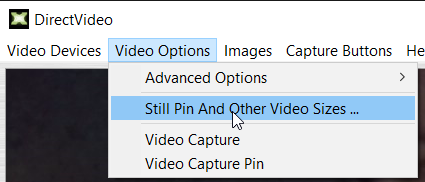
If the camera is not taking images with its capture button, there may be one additional step needed. Click the Video Options tab and select "Still Pin And Other Video Sizes ...":
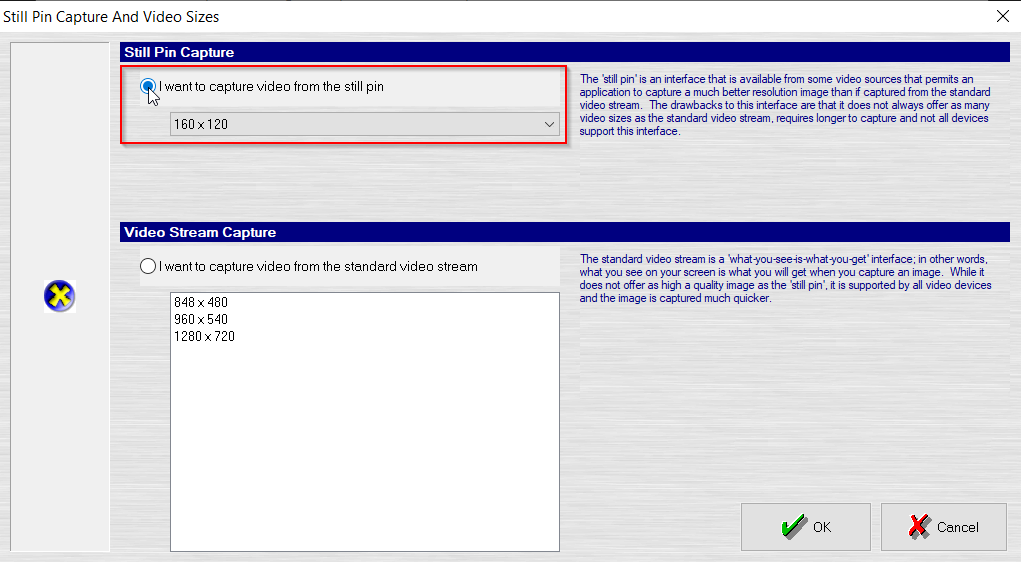
From the following menu, select the radio button for "I want to capture video from the still pin," then click OK. (Note: If there is no resolution within the Still Pin Capture, do not set it for the still pin or the camera will continuously take photos.)
The new camera should be ready for use - be sure to test on a test patient record before active use to familiarize.